Train ML models
Your machines capture data in the field. Training uses that data to produce a model that runs on the machine, whether the model labels what a camera sees, controls an arm, or does something else.
Viam lets you deploy a model from the registry or upload a model you already have, such as one from Hugging Face. Some registry models need no training at all: SAM 3 detects whatever you name in a text prompt. When no existing model knows your labels or is accurate enough on your data, fine-tune one with built-in training or a custom training script. Viam runs training jobs on its own cloud GPUs, and the result deploys to your machines the same way as any other model.
Types of models
Every model has a task type, which says what the model does and decides what data it trains on.
| Task type | The model | Example | Example base models | Training |
|---|---|---|---|---|
| Single label classification | Assigns one label to each image | Is this part on the line good or defective? | EfficientNet | Built-in or custom |
| Multi label classification | Assigns one or more labels to each image | Which safety gear, such as a hard hat or a vest, is this worker wearing? | EfficientNet | Built-in or custom |
| Object detection | Finds objects in an image and draws boxes around them | Where is each package on the conveyor? | YOLOv8, RetinaNet | Built-in or custom |
| Robot policy | Drives a robot to do a task | Pick up the cup and put it in the bin. | SmolVLA, NVIDIA Cosmos | Custom only |
| Other | Anything the other types don’t describe | Predict a value, such as a motor’s temperature, from sensor readings. | None: a regression model trained from scratch | Custom only |
How training works
Training is a loop. A deployed model captures more data as the machine uses it, and that data trains the next version.
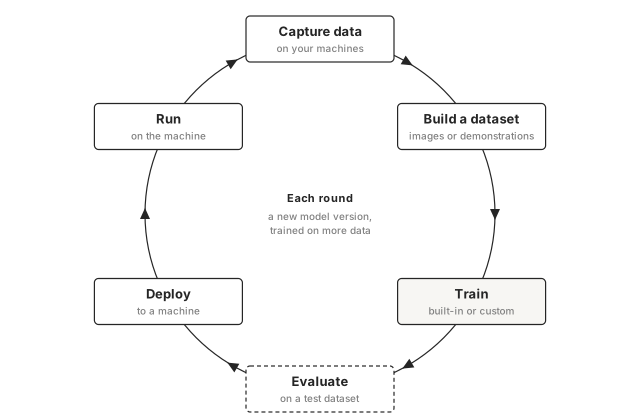
1. Capture data. Machines capture data from their cameras and sensors and sync it to the cloud.
2. Build a dataset. A dataset collects data from any of your organization’s machines into one named collection. What goes in it depends on the model: images you label for a vision model, or recorded demonstrations you tag with the task for a robot policy.
3. Train. A training job reads the dataset in the cloud and publishes the result as a new model version in your organization’s registry. Built-in training needs no code; a custom training script runs your own code. When the job starts, Viam snapshots the dataset, so the model trains on exactly the data and labels the dataset held at that moment. You can keep changing the dataset without affecting jobs already running or models already trained.
4. Evaluate. Before you deploy a classification or detection model, evaluate it on labeled images it wasn’t trained on. The evaluation reports the model’s precision and recall for each label, so you can see which labels it gets wrong before it runs on a machine.
5. Deploy. Deploying adds the model and the resource that runs it to a machine’s configuration. The machine downloads the model from the registry.
6. Run. What you do with a deployed model depends on what it is. A vision model answers through a vision service, which your code or other services query for classifications and detections. Other models are used through the module that runs them. While the model runs, the machine keeps capturing data, including the cases where the model gets it wrong.
Retrain.
In cases where the model struggles, you add data to the dataset and train a new version.
A machine whose configuration uses the model’s latest version downloads the new version automatically, with no manual download or restart.
For vision models, auto-predictions let an existing model draft labels for new images, so each round takes less hand-labeling.
Evaluating each version on the same test dataset shows whether the new one is better.
Built-in or custom training
Built-in training is part of the Viam platform: pick a labeled image dataset and train a classifier or object detector without writing code. A custom training script lets you train any type of model and control the architecture, preprocessing and hyperparameters, but you write the script yourself or find one in the registry.
| Built-in training | Custom training script | |
|---|---|---|
| Task types | Single label classification, multi label classification, object detection | Any, including robot policy and Other |
| Training data | The images in a binary dataset; other files are skipped | A binary or sequence dataset, read however your script needs |
| Code | None: you pick a dataset, the labels to learn and a framework | A Python script you write or find in the registry, run in a Viam-managed container with TensorFlow or a custom training container with your dependencies |
| Model | A pretrained image model with its layers kept fixed, plus new layers trained on top to predict your labels | Any model your code builds or loads, including large pretrained models such as robot policies |
| Control | The labels and the framework | Everything: architecture, preprocessing, augmentation, hyperparameters |
| Framework | TFLite or TensorFlow | Any, declared by the script: TFLite, TensorFlow, PyTorch, ONNX, or Registry for a model a module runs |
| Compute and cost | Viam cloud GPUs | More powerful Viam cloud GPUs, billed at a higher rate |
| Dataset minimums | 80% labeled, at least 10 examples per label | Whatever your script requires |
The framework is the format of the model’s files, and it decides what runs the model on your machine: an ML model service for TFLite, TensorFlow, PyTorch and ONNX, or the module the model names for Registry. Check that a service for your framework supports your machine’s hardware before you train; see What runs the model.
A custom job’s task type and framework come from the training script, which declares them when it’s uploaded to the registry, so every model a script trains has the same ones.
What’s next
- Create a dataset: collect the images or demonstrations your model trains on.
- Train a vision model with built-in training: train an image classifier or object detector without writing code.
- Train a model with a custom training script: train a robot policy or any other model with your own code.
- Deploy a model to a machine: add a trained model and what runs it to your machine.
Was this page helpful?
Glad to hear it! If you have any other feedback please let us know:
We're sorry about that. To help us improve, please tell us what we can do better:
Thank you!